


Chipmunk
4.3138.00 Reviews
App Specs
- Version
- 2.12.1
- Updated On
- License
- Free
- Downloads
- 50,000+
- Developer
- BusPlanner Inc.
- Categories
- Travel & Local
- Platform
- Android
Screenshots
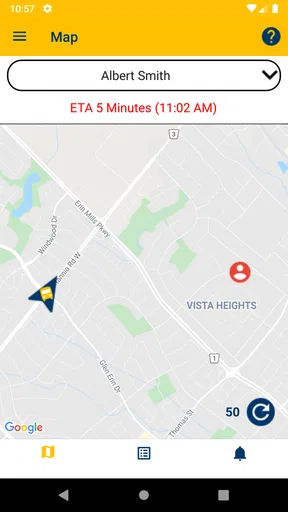
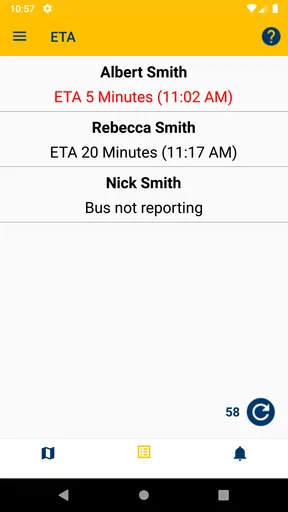
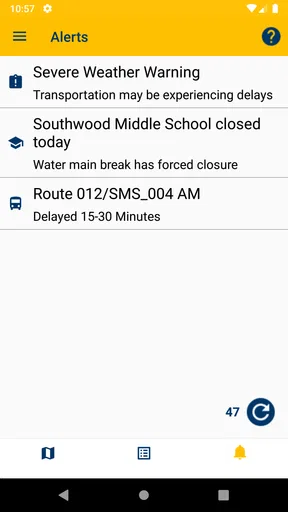
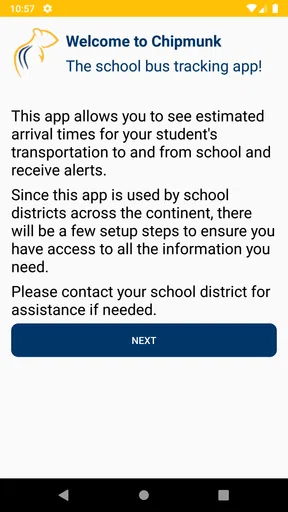
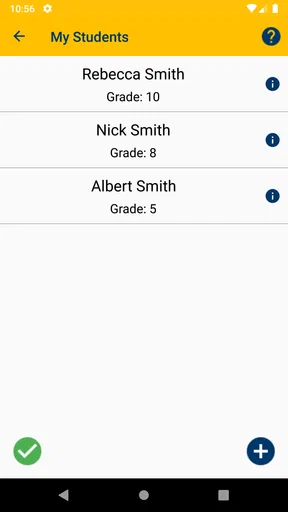
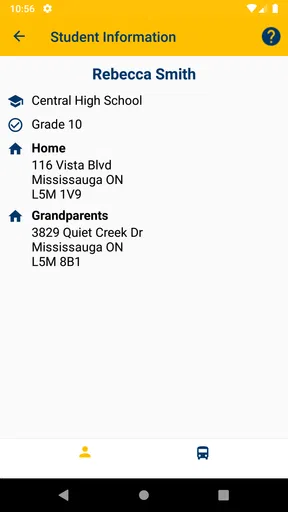
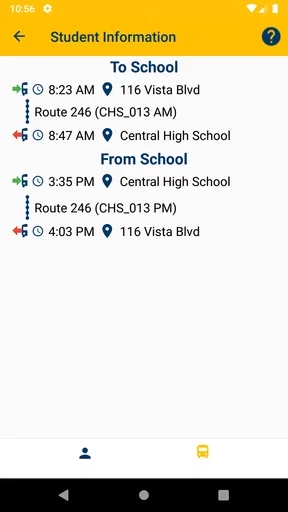
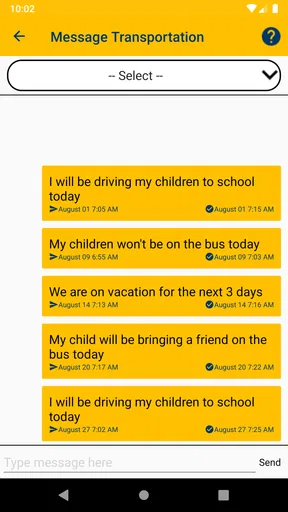
 Analysis by AppCompare
When I first looked at Chipmunk, I understood its appeal immediately: it is a focused travel and local app for parents who want a clearer view of their children’s transportation. Its short promise is simple, but the real question is whether that simplicity matches your family’s routine. I would not choose it because it tries to replace every travel tool on a phone. I would choose it because it concentrates on one stressful part of the school day: knowing what is happening with a child’s ride.
Chipmunk is free, developed by BusPlanner Inc., and available for an Everyone audience. It has reached over fifty thousand installs and holds a 4.4 average from more than four hundred ratings, with over one hundred written reviews. Those figures suggest that the app has found a useful place for families, although they do not remove the need to check whether it fits the transportation arrangements used by your child’s school or local service.
What I would check before choosing Chipmunk
My first decision criterion would be the transportation setup itself. Chipmunk is not a general map, a public-transit planner, or a replacement for a school’s entire communication system. Its value depends on whether the service connected to your child’s transportation uses it as part of the information flow. If your school or local transportation provider does not work with the app, installing it alone will not create useful tracking information.
That is the most important distinction between Chipmunk and familiar alternatives such as a standard map app, a school email, or a group messaging thread. A map can help me plan a route, but it does not necessarily tell me what is happening with my child’s assigned transportation. An email may contain a general announcement, but it is easy to miss when the morning is busy. A family chat can spread updates quickly, yet it often depends on another parent noticing and forwarding the right message.
I would also consider how many people need the information. A single parent who handles every pickup may prefer one dependable place to check. A family with two caregivers, grandparents, or a changing after-school routine has a stronger reason to use a dedicated transportation app. The benefit is less about adding another icon to the phone and more about reducing the number of places where an important update might appear.
Another practical question is how often transportation changes. If the route and pickup plan are almost always predictable, a school notice may be enough for you. If delays, altered arrangements, or different pickup responsibilities are common, a purpose-built tool becomes more attractive. I see Chipmunk as most useful when transportation information is important enough to check regularly but not important enough to justify juggling several separate channels.
The app runs on Android devices using at least version 5.0, which makes it accessible on many older phones. That matters for families who share devices or keep an older handset for a caregiver. The current version is 2.12.1, so I would still keep the app updated when possible, especially if transportation information is time-sensitive. I would not treat an old phone as an automatic reason to skip it, but I would make sure the device remains reliable for notifications and everyday checking.
Worth Reading Before You Choose

EA SPORTS FC Mobile 26 Is a Bigger Football Game, but It Takes Time

Flipboard Shows What News Apps Must Do Beyond the Feed

Switching to Android Auto Means Rethinking Your Driving Routine

Google Calendar Makes a Crowded Week Easier to Manage

Ludo King Makes the Most of the Minutes Between Plans

Baby Panda World Brings Quick Play to Modern Phones, but Its Game Library Feels Busy
A useful morning routine rather than constant checking
One of my preferred ways to use an app like this would be to make it part of a short routine instead of watching it continuously. Before the children leave, I would check the transportation information once, confirm that the plan looks normal, and then move on with the morning. Later, I would check again only when a pickup or arrival decision actually matters.
This approach has a small but meaningful advantage. Parents often lose time switching between messages, calendars, maps, and school portals. A focused transportation app can act as the first place to look. It does not eliminate the need for common sense or direct communication, but it can make the initial check more consistent.
I would also use the same routine when another adult is responsible for pickup. Rather than sending a long message with details that may become outdated, I would tell that person where to check the transportation status and make sure they understand the child’s regular plan. That is a non-obvious strength of having a dedicated tool: it can reduce the number of manual handoffs between adults.
Where Chipmunk earns its place
The strongest part of Chipmunk is its narrow purpose. It is designed around keeping parents up to date on children’s transportation, and that focus is more useful than a large collection of unrelated travel features when the problem is specifically school travel. I appreciate apps that do not make me search through restaurant listings, route options, or tourist information before reaching the detail I need.
For a parent, clarity is often more valuable than feature volume. The app’s Travel & Local category might sound broad, but its practical use is much more specific: it belongs in the daily routine of families who need transportation updates connected to their children. That makes it easier to judge. I would not ask it to serve as my general navigation app, and I would not expect a navigation app to provide the same family-centered context.
Chipmunk also makes sense for households where transportation responsibility moves between people. Imagine a weekday in which one parent handles the morning, a grandparent handles the afternoon, and the other parent needs to know whether plans have changed. A shared transportation reference can be more dependable than three separate text conversations. The real advantage is not simply speed; it is reducing the chance that one person is working from an old message.
There is another useful trade-off here. A dedicated app can feel less flexible than a messaging service, but that structure is also what makes it easier to return to. In a chat, an update can disappear under unrelated conversation. In a school email inbox, the relevant message may be mixed with forms and reminders. Chipmunk is better suited to the person who wants transportation information kept in its own context.
I would especially recommend trying it during a normal week rather than judging it after one quiet day. The app’s value becomes clearer when you use it during the moments that usually create uncertainty: a rushed morning, a change in who is collecting the child, or a day when a parent needs to coordinate with another caregiver. Those situations reveal whether it genuinely reduces friction in your household.
How I would use it in a realistic situation
Consider a parent who normally works from home but has an afternoon appointment. The child’s usual pickup arrangement may still be valid, yet the parent needs confidence that the transportation plan has not changed before leaving. I would check Chipmunk before the appointment, tell the backup caregiver where the current information is kept, and avoid relying on a screenshot that could become stale.
If the child is expected home around the usual time, I would use the app as an information check rather than treating it as permission to stop communicating. A transportation update can help me decide when to leave work or when to meet the child, but I would still keep a direct contact method available for unusual circumstances. That is an important boundary: Chipmunk can support a family plan, but it should not become the only safety arrangement.
For families with more than one child, the benefit may be even more practical. Different children can have different transportation routines, and remembering which message applies to whom is difficult when information arrives through scattered channels. A dedicated app gives me a better starting point for checking the relevant child’s transportation before I make a decision.
Small habits that make the app more useful
I would start by checking the app at a calm moment, not during the first rushed morning when everyone is trying to leave. That gives me time to understand how the information is presented and to identify which details matter for my family. It also prevents the common mistake of assuming that installing the app is the same as completing the setup.
Next, I would agree on one household rule: whoever is responsible for pickup checks the current transportation information before leaving. This avoids a common weakness of shared family tools, where everyone assumes somebody else has looked. The app can centralize information, but the family still needs a simple habit around it.
Finally, I would avoid treating every update as a reason to change plans immediately. I would read the information carefully, compare it with the child’s regular arrangement, and contact the school or transportation provider directly if something appears confusing or urgent. This is where my experience with focused apps leads me to be cautious: convenience is valuable, but interpretation still belongs to the adult responsible for the child.
When another category may suit you better
Chipmunk is not the right choice for everyone. If your main need is finding the fastest route across a city, a conventional navigation or public-transit app is likely a better fit. Those tools are built for comparing routes and planning journeys, while Chipmunk is aimed at keeping parents informed about children’s transportation. Choosing between them depends on the question you need answered.
If your school already communicates every transportation change through a reliable parent portal, Chipmunk may feel like an extra step. Some families prefer one official website or one email account and do not want a separate app. In that situation, the deciding factor is whether Chipmunk makes access faster and clearer than your existing method. If it merely duplicates information you already check without effort, the advantage will be limited.
Messaging apps are also a reasonable alternative for small, highly coordinated groups. A parent group can be useful when people need to discuss an unusual pickup, but it can become noisy and informal. I would choose a group chat for conversation and last-minute coordination, not as my only source for structured transportation information. Chipmunk has the stronger case when the goal is checking rather than discussing.
A calendar app may be enough for families whose transportation schedule never changes. Calendars are excellent for recurring reminders, but they do not automatically solve the problem of updated transportation information. I would use a calendar to remember the normal routine and Chipmunk to check the current situation when the distinction matters.
There is also a privacy and attention trade-off that parents should consider without overcomplicating it. Every additional family app requires another routine, another update cycle, and another place to remember. Chipmunk earns its space only if it replaces confusion with a clearer check. If it adds another notification stream without improving your decisions, the usual school communication method may be more comfortable.
The cost of changing your routine
Because Chipmunk is free, the financial barrier is low. The real cost is attention. I would need to install it, connect it to the relevant transportation arrangement if required, learn where to look, and explain the routine to any other adult involved in pickup. That is not a major burden, but it is still a form of switching cost that is easy to overlook.
The transition is easiest when I introduce the app alongside the existing method rather than abandoning the old method immediately. For the first several transportation days, I would compare what I see in Chipmunk with the school’s normal communication. If both align, confidence grows naturally. If they do not, I would pause and ask the transportation provider which source should be treated as current.
I would also plan for the possibility that not every caregiver wants the app. A grandparent may prefer a phone call, while another parent may want direct access. The practical solution is not to force everyone into one tool, but to decide who needs to check the app and who simply needs the resulting plan. This keeps Chipmunk from becoming a family argument about technology.
Another switching cost is habit formation. Parents are often already managing school calendars, meal plans, work messages, and appointments. I would place Chipmunk near the apps I use before school pickup and give it one clear purpose. I would not open it repeatedly out of anxiety. A predictable check is more sustainable than constant monitoring.
The app’s Everyone content rating also makes it comfortable to consider as a family utility rather than an entertainment product. That does not mean every child needs to use it directly. In my view, the adults responsible for transportation should remain the primary users, while children can continue following the family’s normal pickup instructions.
My recommendation for parents deciding today
I recommend Chipmunk when your child’s transportation is supported by the service behind the app and your household regularly needs current information. It is particularly appealing if updates are easy to miss, several adults share pickup duties, or you want a dedicated place to check before leaving work or home. Its free price removes the main financial objection, and its focused purpose is more useful than a broad travel app for this specific job.
I would skip it if you are looking for route planning, general navigation, or a complete school communication platform. I would also skip it if your existing school portal already gives you the same information in a way that everyone in the household reliably uses. In those cases, adding another tool may create more maintenance than value.
My final advice is to judge Chipmunk by one practical test: after using it through an ordinary transportation week, do you feel more certain about who is collecting your child and when you need to act? If the answer is yes, it has earned a permanent place on your phone. If you still need to search emails, ask in a group chat, and call the school for the same basic update, the issue may be compatibility with your local transportation setup rather than the app itself.
BusPlanner Inc. has kept the idea straightforward, and that is both the app’s strength and its limitation. It does not need to compete with every travel tool. It needs to make children’s transportation information easier for parents to follow. For families whose schools and transportation arrangements connect with it, I see Chipmunk as a sensible, low-cost way to bring that daily check into one focused place.
My recommendation is simple: try Chipmunk if transportation updates are a recurring source of uncertainty, but keep your school’s official contact route and your family’s direct communication plan available for anything unusual.
Pros
- Simple interface that is easy to understand from the first use.
- Lightweight app with modest storage and battery requirements.
- Useful controls make everyday tasks quicker to manage.
- Responsive performance on compatible Android and iOS devices.
- Regular updates can improve stability and add useful refinements.
Cons
- Some features may require an internet connection to work properly.
- The free experience may include advertisements or optional purchases.
- Compatibility and performance can vary between older devices.
- Settings may feel limited for users who want advanced customization.
- Privacy permissions should be checked carefully before creating an account.
FAQs for Chipmunk
What is Chipmunk, and what can I use it for?
Chipmunk is generally associated with a mobile app designed around chipmunk-themed entertainment, content, or interactive features, depending on the specific version available in your region. Before downloading, check the app-store description, screenshots, developer name, and recent update notes to confirm its exact purpose. The name may refer to more than one application, so verifying these details helps avoid installing the wrong app.
Is Chipmunk free to download and use?
Chipmunk may be available as a free download, but some features can require in-app purchases, subscriptions, advertising support, or account registration. Users should review the pricing section on Google Play or the App Store before installing, especially if the application offers premium content or upgrades. Also check whether subscriptions renew automatically and learn how to cancel them through your device’s store settings.
Does Chipmunk work on both Android and iPhone?
Compatibility depends on the particular Chipmunk application and its developer. Check the official Google Play or Apple App Store listing to confirm whether it supports Android, iPhone, or both platforms. The listing should also show minimum operating-system requirements, supported devices, and the latest update date. Older phones may experience limited performance even when the app technically meets the stated requirements.
Does Chipmunk require an internet connection or personal information?
Many mobile apps require an internet connection for downloading content, synchronizing data, displaying advertisements, or accessing online features, while some basic functions may work offline. Chipmunk’s exact requirements depend on its version and purpose. Before granting permissions, review whether it requests access to storage, notifications, location, microphone, contacts, or other personal data, and disable permissions that are not necessary.
Is Chipmunk safe to download and suitable for children?
Download Chipmunk only from an official app store and confirm the developer, ratings, reviews, permissions, privacy policy, and age classification before installing it. If children will use the app, parents should inspect advertisements, external links, chat or social features, and possible purchases. Store parental controls can help restrict downloads and payments, but supervision is still recommended because ratings may vary by region and app version.


